
Projection Mask
Crop the output to an irregular shape using a polygon mask with optional feathered edges.
The mask is machine geometry, like window.*. The player applies
projection.mask from config.json at every start, including the normal
exhibition entry. It is not playback recovery and does not follow RuntimeMode.
There is one data model and one Validate → Apply → Persist path. The local
Mask Editor is the recommended place to refine vertices. Web Console can
coarse-tune enable / invert / feather. Both write the same projection.mask.
Settings does not edit vertices.
To persist a disabled mask, send maintenance mask_set with "enabled": false,
or set projection.mask.enabled to false and clear points_norm, then restart
the player to apply the saved configuration.
Open Tools → Open mask editor. On the machine this defaults to on-screen
editing. The panel canvas is the backup for Remote Debug or when you cannot
stand at the output. Save writes config.json.
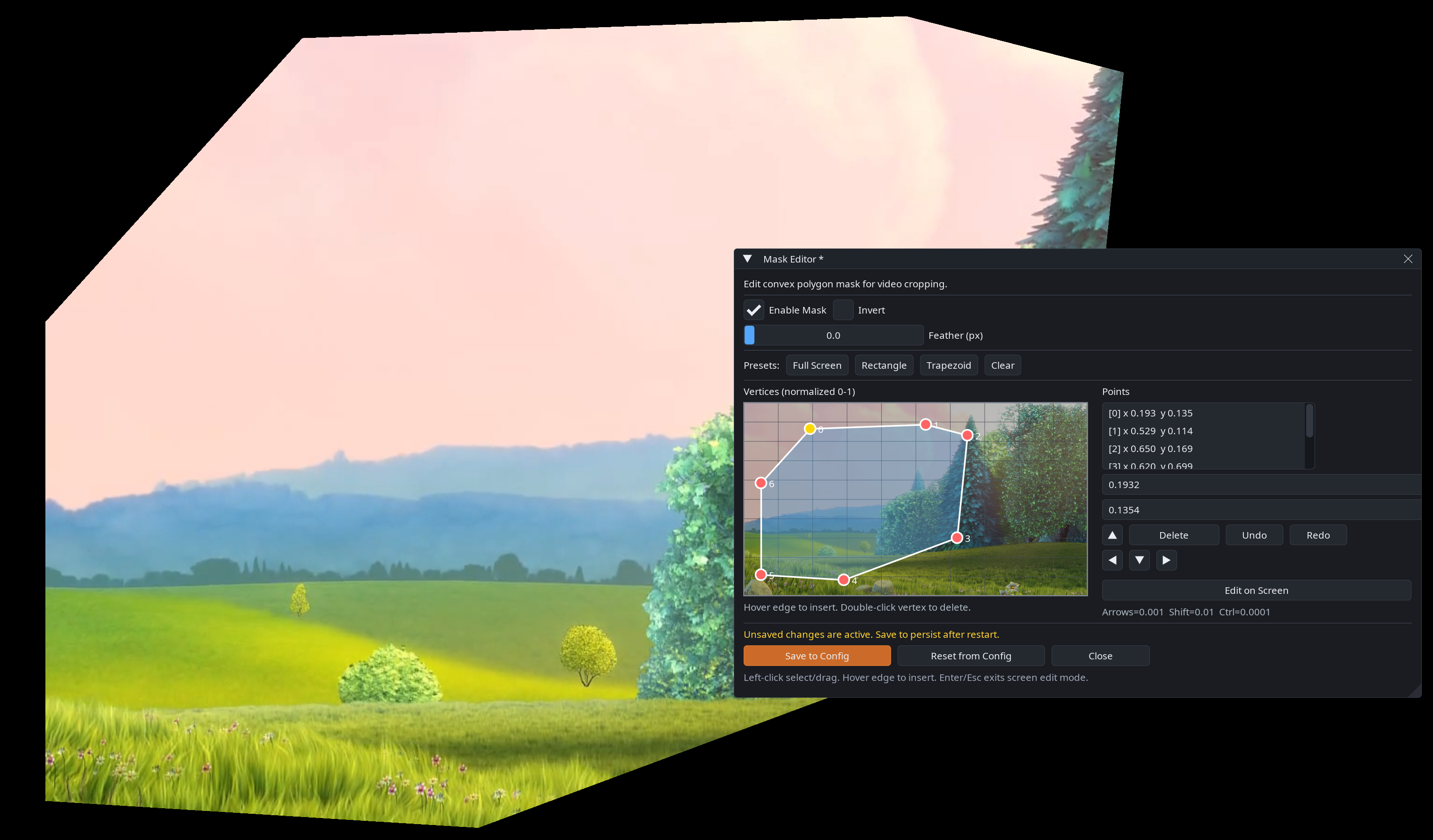
Mask editor UI
- Open the debug panel → Tools → Open mask editor.
- Enable the mask, optionally invert it, and set feather in pixels.
- Start from Rectangle, Full screen, or Trapezoid, then drag vertices (normalized 0–1). On-screen edit is the default; Esc returns to the panel.
- Keep the polygon convex and ordered; invalid shapes keep the last valid render until fixed. Undo and arrow-key nudge remain available.
- Save to config. The saved geometry is loaded on the next normal startup.
Remote Debug can drive the same editor from a browser using the panel canvas when you cannot operate the output directly.
What the mask controls
A mask defines which part of the rendered output is visible. Setup happens in
the Mask Editor or via maintenance mask_set, then the result lives in
config.json for production.
Config
{
  "projection": {
    "mask": {
      "enabled": true,
      "invert": false,
      "feather_px": 12,
      "points_norm": [[0.05, 0.10], [0.95, 0.08], [0.92, 0.90], [0.08, 0.88]]
    }
  }
}
Commands
Use GET /api/extensions/mask to read the current render geometry, and
mask_set through POST /api/extensions/command to change it. mask_set
requires Maintenance mode and source access. It is not dev-only. It uses the
same validation, apply, and persist path as Mask Editor Save. The old
mask_get command is gone; do not treat a fire-and-forget command ack as a query.
Command envelopes:
{"cmd":"mask_set","params":{"feather":20}}
{"cmd":"mask_set","params":{"enabled":true,"points":[[0.10,0.10],[0.90,0.10],[0.50,0.90]]}}
Prefer points as [[x,y],...]. {x,y} objects are secondary compatibility.
Invalid polygons return MASK_INVALID_POLYGON and are not written to disk.
If the Mask Editor is open, a successful remote mask_set discards the unsaved
draft and resets the editor session to the new geometry.
Limitations
Only convex polygons are supported. Keep points ordered and avoid self-intersections.
For exact mask command parameters, use the Command Reference.
Previous / Next
- Previous: Image Overlays